
If you have used an app like Skybox or anything that supports networking with video. (VLC) You have probably heard about DLNA
DLNA stands for
- D: Digital
- L: Living
- N: Network
- A: Alliance
That sounds wrong but it’s true!
One of the easiest ways to set up a media server like this is to use the most common and easy to use DLNA software. Plex.
Plex is a free (but it tries to shove subscriptions down your throat) app for DLNA users. If you don’t know what DLNA is. You can even install the Plex app without having to configure DLNA. So without further ado. Let’s get right into it!
How to install plex
Plex is very simple to install! Go to this link and it is as easy as clicking Download!
After that. Run it, give it admin. Then profit! You have a media server running. Now, go to http://plex.tv/web. Might wanna bookmark that. After that. you should see the first time setup screen. Click through, (I highly suggest you read the terms and conditions.) Once you get to library setup. Select Music to be your first library. and select the Music folder. ( C:\Users\[Your name]\Music )
This will be our first test library.
Now. Open music in file explorer and put all of the contents of this zip file into the music folder.
http://www.mediafire.com/file/6hdx3wzjwhg4314/My_Music.zip/file
After you do that. click through until you are at the main menu. It should look like this
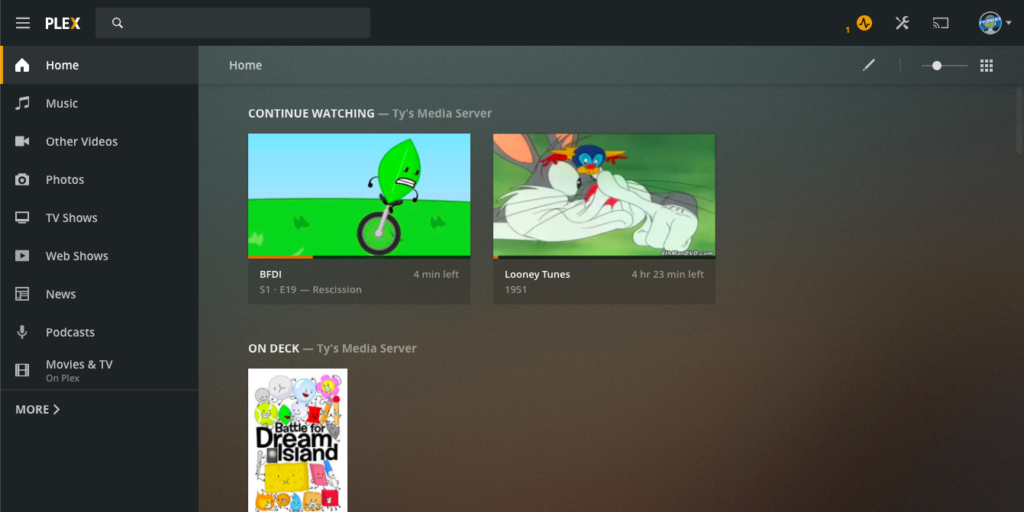
Now, click the Music icon in the sidebar. Play one of the tracks! by going to various artists>Unknown album.
Congrats! you have set up your plex media server! My job here is done,
Goodbye!
Leave a Reply