
Have you heard that Cydia impactor is broken? Yes! It is very much broken. That’s why I’m here. To tell you about an alternative to Cydia impactor, AltDeploy!
Just know that at the time of writing, It only works for mac users, but let’s get into it!
How to install AltDeploy
Installing altdeploy is pretty simple, Here’s a list of what you need.
You need a,
- Computer
- Internet Connection (i think you have this)
- iPhone
- Lightning cable
Next. Download AltDeploy from this link, Once you have downloaded AltDeploy, Open it up, Once you have opened AltDeploy, you should see this screen.
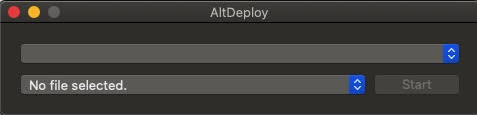
After you see that screen, follow this video to learn how to set up the Mail Plugin
Just know that where it said Remove Mail Plugin is where its gonna say Install Mail Plugin
How to get an IPA onto your iPhone
Here’s another list on what you will need to install your first IPA
You will need
- A computer
- An iPhone
- A Lightning Cable
- iTunes (you can get that here.)
- AltDeploy
- Retroarch (this will be our example IPA, you can get this here.)
Now. Open up altdeploy and click on No File Selected, Then, click on Browse. Now, click on wherever you saved your Retroarch IPA file. After you choose that file, plug in your iPhone, Your device’s name should show up, For example: John Doe’s iPhone, Bill’s iPad. After that. Once you click Start, It should do the process! There’s one thing we still need to do though.
How to get the app to run on your iPhone
Go to Settings > General > Profiles and Device Management > Your apple id > Trust apps, Need a more visual explanation? Watch the video below!
Where it says “Delete app” It should say there is an option to “Trust” the app. After that, Open retroarch on your iPhone! It should work. Now you have retroarch on your iPhone. My job here is done! I’ll see you later.
Bye-Bye!
Leave a Reply