• Home
  • Youtube
  • Hackable Devices

Ty Talks Tech

Stop talking tech, unless it's Ty Talks Tech.

You are here: Home / Apple Shortcuts / How to enable Untrusted shortcuts

How to enable Untrusted shortcuts

January 18, 2020 by Ty 1 Comment

Enabling untrusted shortcuts is pretty simple. I will guide you through how to do it in this text! It is very simple. Now, Let’s get into it!

What you need to do to enable it.

Go to Settings, then follow the instructions in this video.

When you are doing this, make sure to choose this option.
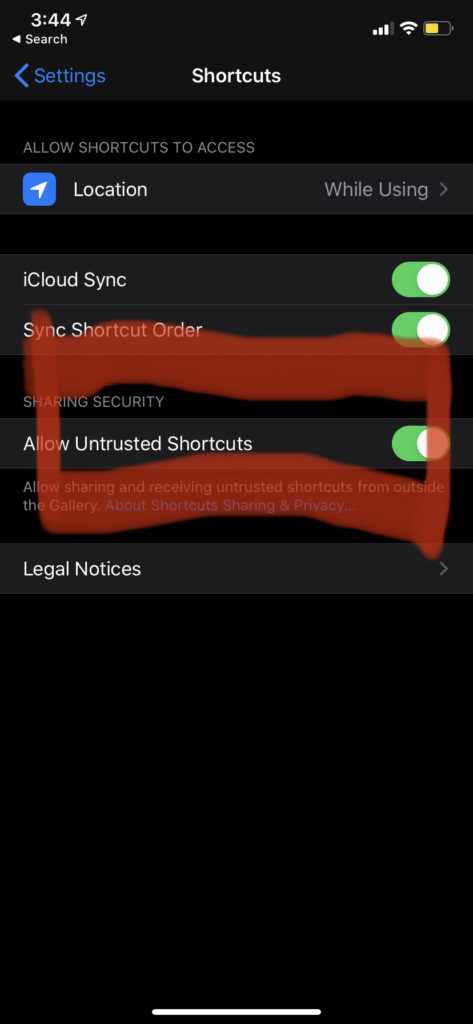
Now you can use untrusted shortcuts! Like the ones from my site! Oh, and if you don’t know where those are, you can find them right here.

Anyway, I must go now, Bye!

Filed Under: Apple Shortcuts

Comments

  1. Johnathan says

    January 23, 2020 at 7:37 am

    Knowing how to work some of the new features in the Apple update is really helpful.

    Reply

Leave a Reply Cancel reply

Your email address will not be published. Required fields are marked *

This site uses Akismet to reduce spam. Learn how your comment data is processed.

Recent Posts: Ty Talks Tech

Tesla Cybertruck: Three Reasons to buy a Cybertruck

How to set up a plex media server.

How to set up a plex media server.

A Review of PS4 Remote Play

A Review of PS4 Remote Play

How to make a profile in Apple Configurator 2

How to make a profile in Apple Configurator 2

Behind The GUI: Why Apple Can’t Stop Altdeploy and Altstore

Connect With Us

  • Email
  • Facebook
  • Twitter

Copyright © 2026 · Magazine Pro Theme on Genesis Framework · WordPress · Log in